HomeAppsSystem ToolsInternetGuard

InternetGuard
For Android devices
Summary
InternetGuard is a versatile Android application designed to offer users greater control over their internet usage. This app allows Android users to manage the connectivity of individual applications, blocking unwanted access to the internet, which can help conserve data usage, save battery life, and enhance privacy. By acting as a firewall, InternetGuard provides an essential layer of security for users who are keen on managing their device's internet interactions without requiring root access. This feature-rich application makes it an appealing choice for those looking to gain more control over their digital life on Android devices.
Screenshots
5
Key Features
Main Features and Practical Benefits
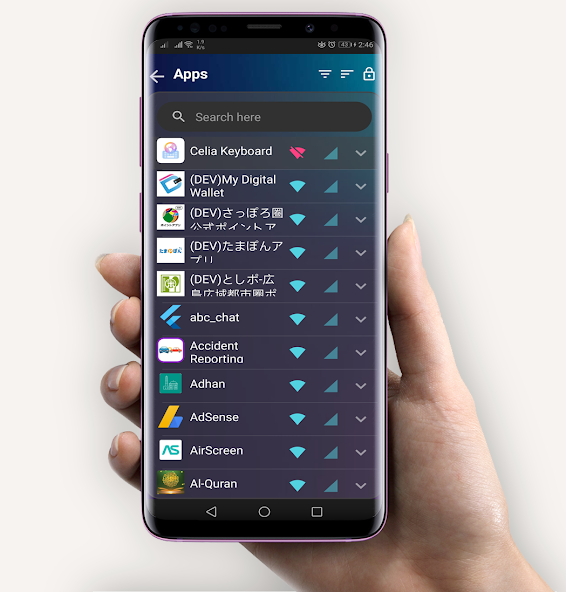
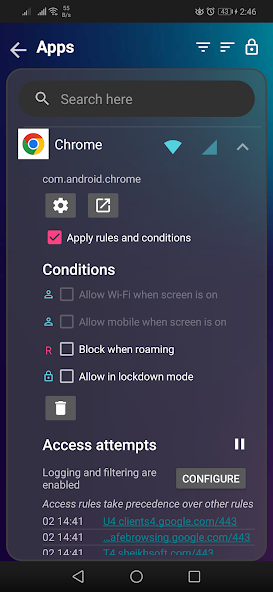
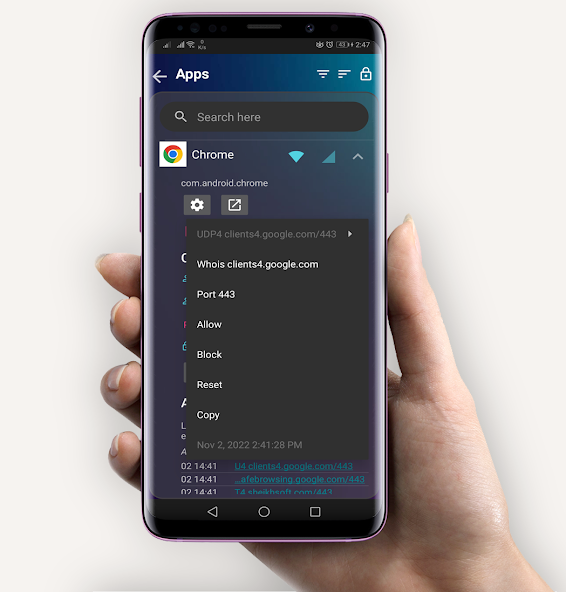
- InternetGuard offers a host of features designed to improve the user experience and protect device data. The application enables users to permit or deny specific apps and domains from accessing mobile data or Wi-Fi, leading to reduced data consumption and battery usage. Moreover, the app strengthens privacy by limiting unnecessary background activity and internet access.
- **Simple Firewall:** InternetGuard functions as a comprehensive firewall without the need for root access. It uses a VPN package to filter and manage data, attributing all data traffic to itself for transparency.
- **Data Usage Insight:** Users can view detailed data usage statistics per application, helping understand and control the volume of data consumed.
- **Flexible Settings:** The app offers customization options, including blocking access when roaming, disabling system apps, and allowing access only when the screen is on. InternetGuard can automatically start at device boot, ensuring consistent protection.
- **User-Friendly Interface:** With its Material Design theme, InternetGuard offers a visually appealing interface with light and dark modes, making it easy to navigate and configure settings.
Technical Information
- Versionv2.53
- App size7.71 MB
- CategorySystem Tools
- Package nameeu.sheikhsoft.internetguard
- DeveloperSheikhSoft
- LanguageEnglish
- Updated2026-11-17
How to Download & Install
- 1
Tap the Download APK button below
- 2
Allow installing from unknown sources if prompted
- 3
Wait for the download to finish, then install the APK file
- 4
Open the app and start using it
Frequently Asked Questions
What is the latest version?
The latest version is v2.53, updated on 2026-11-17.
How large is the download?
The download is about 7.71 MB. Downloading over Wi-Fi is recommended.
Which category is it in?
It is listed under "System Tools" and developed by SheikhSoft.
What is the package ID?
The package ID is eu.sheikhsoft.internetguard; you can use it to verify the app source before installing.
About this app
User Experience and Interface
The user interface of InternetGuard is designed with simplicity in mind. The Material Design theme provides users with an intuitive experience, allowing easy navigation and configuration of desired settings. Users can choose from five different themes, enhancing personalization. The clean interface ensures that even those new to such applications can manage and understand their internet usage effectively.
Compatibility and Requirements
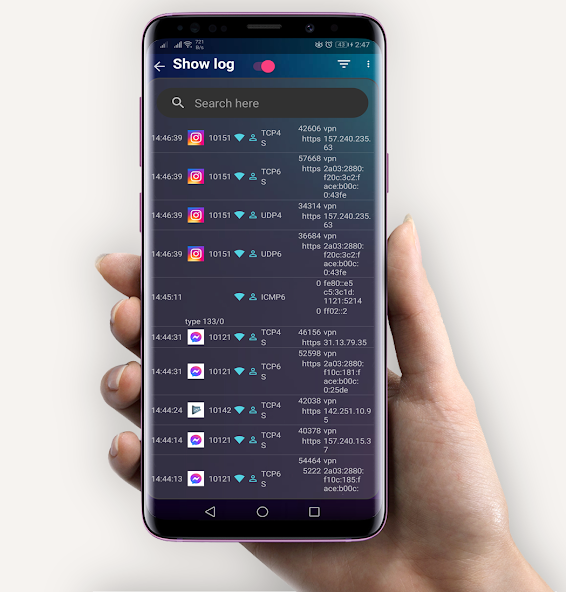
InternetGuard supports Android devices running version 5.1 and above. It is compatible with a broad range of devices, ensuring that a wide audience can benefit from its features. The application works seamlessly across different network types, including IPv4/IPv6, TCP, and UDP protocols, and supports network sharing across multiple devices.
Advantages and Limitations
One of the primary advantages of InternetGuard is its ability to manage internet connectivity without needing root access. This allows users to leverage powerful firewall features on standard Android devices. However, this functionality may give the impression of high data usage because all traffic is routed through the VPN package, attributed to InternetGuard. Nonetheless, this seemingly high data usage is only an artifact of how data monitoring is structured.
Explore InternetGuard for Enhanced Control
InternetGuard stands out as a robust application for users aiming to optimize their Android device's internet management. By providing essential tools to block unwanted data access and enhance privacy, it caters to tech-savvy users and those merely seeking better control over their mobile data. Interested users can explore the APK download options to experience firsthand the benefits InternetGuard offers. Its comprehensive features and user-friendly interface ensure it remains a valuable app for Android device users looking for enhanced security and management in a non-root environment.
Related Apps
See more